Table of Contents
6 sections
Meta Ads Video Downloader: Stop Paying to Save Competitor Ads
 Hemanth M Reddy
 ChatGPT
We built a free Chrome Extension to download Meta ads (video, copy, thumbnail) in one click. Open source. No paywalls.
Download on GitHub →It really bothers me.
You go to the Meta Ads Library. You see a competitor running a great ad. You want to save it, analyze it, and maybe send it to your editor as a reference.
But you can’t.
Right-click save? Doesn’t work.
inspect element? Tries to save the blob url (which breaks).
Screen record? Low quality + UI clutter.
So what do you do? You Google "Meta Ads Downloader" and find 10 different tools.
All of them want $29, $49, or even $99 a month.
For what?
To download a video file that is publicly available on the internet?
This isn’t "SaaS." This is gatekeeping basic functionality. Analyzing your competitors isn't a "premium feature." It is the basic right of every advertiser.
So we built our own. And we are giving it away for free.
Meet Meta Ads Downloader by Nomiris
We didn't build this to be a billion-dollar startup. We built it because we were tired of getting our credit card out every time we just wanted to do some research.
It’s a simple Chrome Extension. It does exactly what you expect it to do, without the paywall.
Get Meta Ads Downloader for free on GitHub →
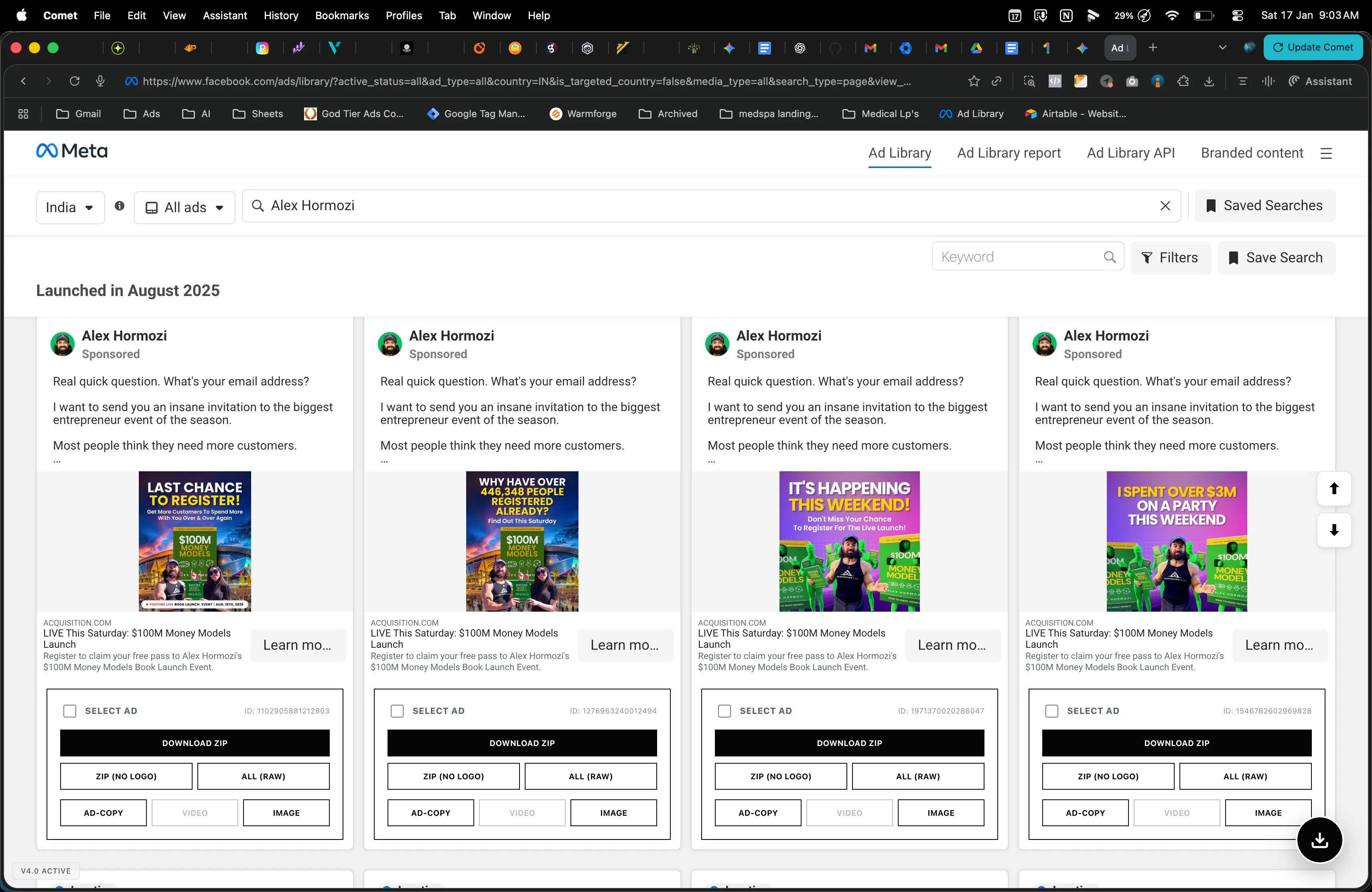 Native-like download buttons injected directly into every ad card.
1. The "Old Gold" Scroll Button
Here is the biggest pain with the Meta Ads Library: **The good stuff is at the bottom.**When you look at a competitor, you don't care about the ad they launched yesterday. You care about the ad they launched 3 months ago that is still active.
If an ad is old and still spending money, that means it is a winner.
But getting to those old ads is annoying. You have to scroll... wait for loader... scroll again... wait... scroll again.
So we added a Auto-Scroll Button. You click it, and it automatically scrolls down to load the next batches of ads. It saves you the thumb-workout and gets you to the winning ads faster.
2. Download What You Need
Select 5, 10, or 15 ads. Download the raw video. Download the ad copy. Save the thumbnail.It just works.
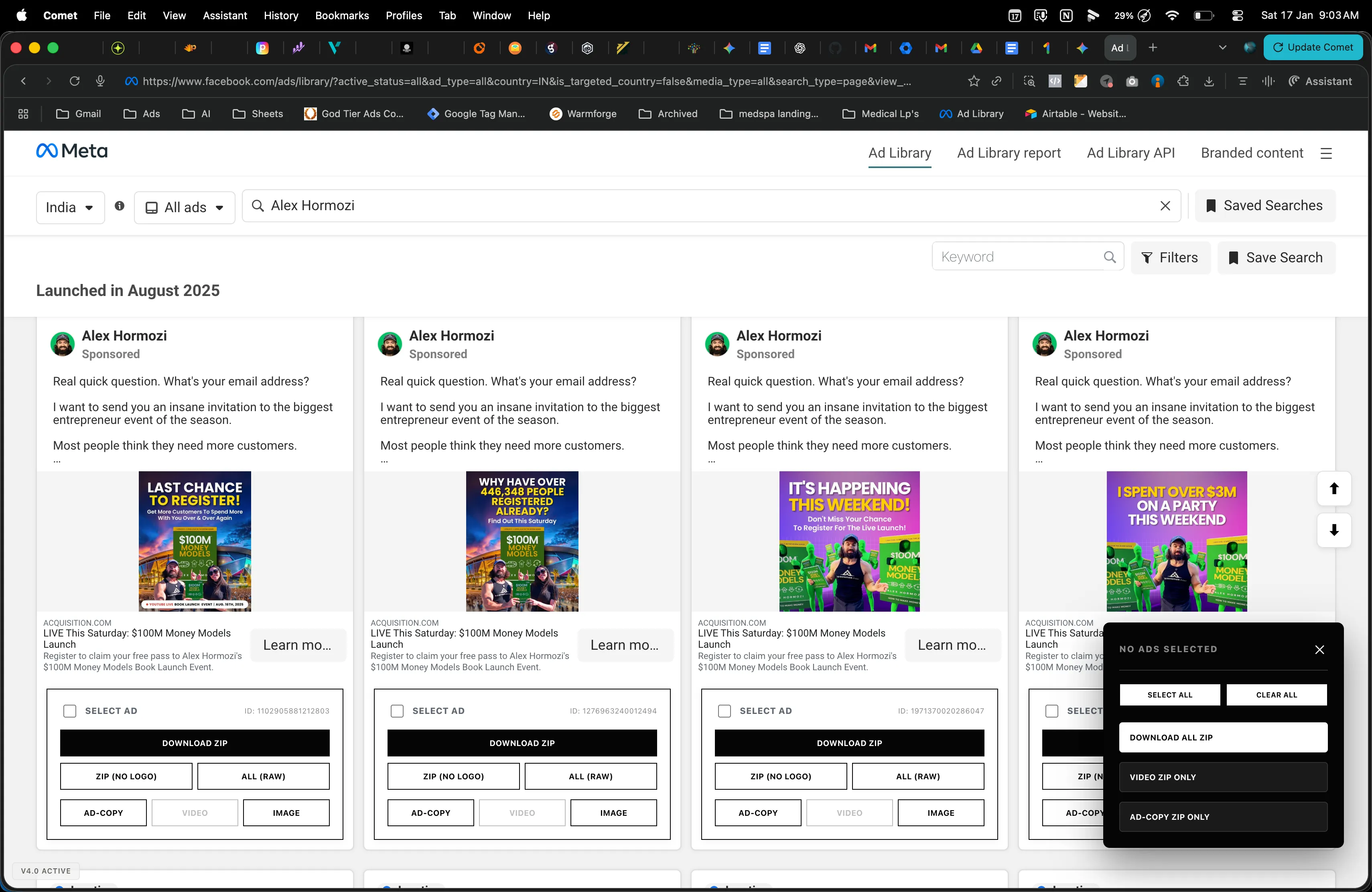 Select multiple ads and download them all in one go.
A Quick Note on "Bulk" Downloading (Honesty Time)
We are ambitious. We *want* this tool to let you download 500 ads in a single click.We are not there yet.
Right now, if you try to download 500 videos at once, Chrome will probably crash. We are working on fixing those memory limits and bugs.
But for your daily workflow - grabbing 5 to 15 best-performing creatives from a competitor to study their hook, pacing, and copy - it works perfectly.
Why Is It Free?
Here is the brutally honest answer:We make money by running ads, not by selling software.
We use this tool every single day to research our competitors. That research helps us run better ads, which makes us money. The "compounding returns" we get from winning ads far outweigh any subscription fee we could charge you.
It costs us $0 in hosting. It doesn’t cost us extra time (we built it for ourselves anyway). So I didn't see a reason why we should charge money for it.
It’s Open Source (MIT License)
This project is fully open-source under the MIT License. That means you can use it, change it, fork it, and build on top of it.I have just one small request: If you find a bug, help us fix it.
We are a small team. If you are a developer and you see a way to make the code cleaner or the downloads faster, please submit a Pull Request. If we can make this tool better, it helps everyone in the community.
Download the extension, save your money, and go find those winning ads.
Built with anger (at paid tools) and love (for advertisers) by Nomiris.
Let Us Find the Gaps in Your Lead Acquisition.
Is marketing complexity slowing down your practice?
If managing your growth feels overwhelming, you don't need another tool - you need a partner. We help medical practices and wellness businesses handle their end-to-end digital infrastructure.
We will deep-dive into your website and funnel to understand exactly where the problem is. Our team fixes the gaps in your positioning and deploys the Nomiris P2P Acquisition System to generate insane ROI:
- Complete Branding, Strategy & Gap Analysis
- High-Converting Landing Pages
- End-to-End Ad Management
- Lead Recovery & Nurturing
- ROI & Attribution Tracking
If you want to stop guessing and start scaling with a data-driven infrastructure, let’s connect.

Hemanth M Reddy
Author
End-to-End Performance Marketing Specialist. I don't just 'run ads'; I fix the foundation. From correcting broken conversion tracking to integrating CRMs, I ensure you own your data and stop wasting budget on ghost leads.